Why it exists
My Canon EOS 7D was sitting on a shelf until I made it the camera in a DSLR film-scanner setup. To preview and control the shots from my Mac I'd normally reach for Canon's EOS Utility, but the 7D only works with EOS Utility 2. That one's older, and it doesn't behave well on recent macOS. You get missing labels, and warnings from macOS that it won't run in future versions.
I also wanted a couple of features aimed at film scanning, so I built this. It's a personal project. It scratched my own itch and helped a friend with a 70D, and maybe a few other people will find it useful too.
And if you're curious about the whole at-home process this fits into, I wrote up how I develop and scan film at home.
What it does
The handful of things that actually matter for the way I use it.
-
Live preview
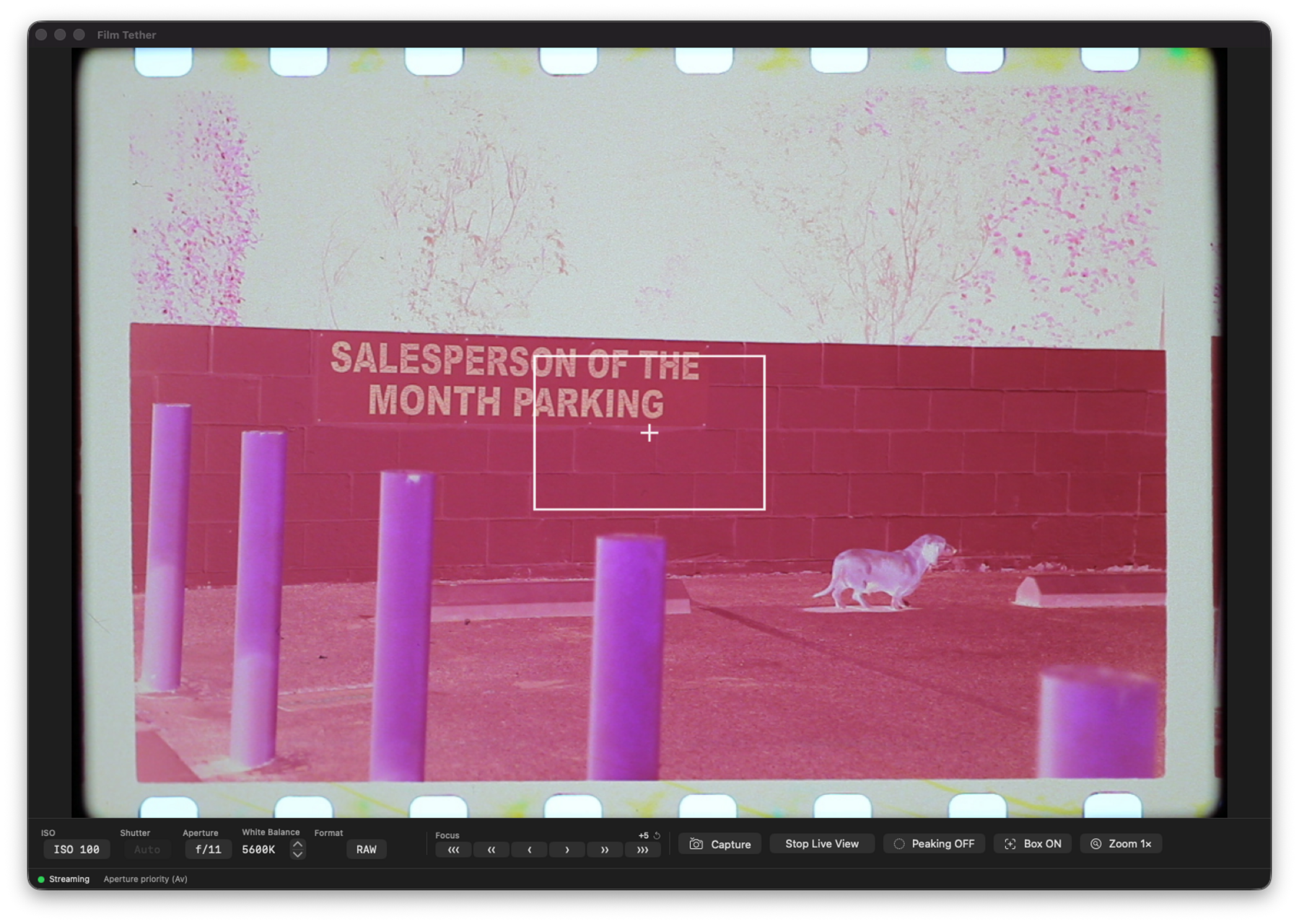
Standard tethered live preview, straight from the camera. On my 7D it's a few frames per second, and a newer body may be quicker.
-
RAW capture
Saves the camera's RAW file straight to a folder you pick, untouched, under whatever type the body actually produced (
.CR2on my 7D,.CR3on newer bodies). -
Work through a roll
Tap Space to fire a frame, which makes working through a roll of negatives quick.
-
Exposure controls
ISO, shutter, aperture, the white balance mode and a Kelvin temperature, all from the Mac.
-
Focus check
Hold Shift to punch in using the camera's sensor and confirm your focus is sharp.
-
Focus control
Step the focus near or far from buttons or the , and . keys, or press AF (or /) to have the camera autofocus. Both need live view on and the lens switch on AF.
Working with negatives
These came out of scanning film, which is what I built the app for. Every one of them changes only what you see on screen. The RAW that lands in your folder is the frame the camera shot, untouched.
-
See the positive
Invert the preview so a negative reads as the picture it's going to become, which makes framing and dust far easier to judge than squinting at an orange rectangle.
-
Black and white
Drop the color out of the preview. Raw pixels off a B&W negative carry no useful color anyway, and exposure is easier to read without it.
-
Click to set white balance
Click the unexposed film base and the preview corrects relative to it. It uses per-channel gains rather than a color temperature, because a film base is off-neutral on both axes and a Kelvin control can only slide between blue and amber.
-
Rotate and mirror
Quarter turns, for when the holder can't be squared up, which happens to me a lot with medium format. Mirror flips it left to right, for film sitting emulsion side up.
-
Crop and straighten
Auto-Crop looks for the negative and puts an adjustable box on it. Drag the corners and edges to fit, and the band just outside the handles straightens it in fine steps. The RAW keeps the whole frame.
-
Three zoom levels
Fit, 100%, and a 500% punch-in that uses the camera's own sensor zoom instead of upscaling a preview JPEG, so when you're checking focus you're looking at real detail.
-
A sidecar for each scan
Optionally writes an
.xmpfile next to each RAW with the camera the negative was shot on, the film stock, the film size and the day the roll was taken, along with the crop, rotation and white balance you had set up. Nothing is written for a scan with nothing to record. -
Live histogram
Sampled from the frame the camera sends, before any of the adjustments above, so it tells you what the sensor is being asked to record rather than what the corrected preview looks like.
Caveats
It's not perfect, and I'd rather be upfront about that than oversell it.
- At 100% zoom, clicking to move the zoom box and the eyedropper are switched off. Click-to-move works at Fit, and the eyedropper at Fit or 500%.
- Tested on a Canon EOS 7D (by me), a 70D and an R5 (by contributors), so I don't know how many other EOS models it works with.
- Making it work with other cameras or other brands might be straightforward, since it's built on the open-source libgphoto2 project. You'd still have to work through it with the camera in hand.
It also sticks to one job: tethered capture. It doesn't develop RAW, correct lenses, shoot video, do time-lapse, or sync to the cloud. Other tools do those better. It's a single local window, with no account, and nothing phoning home.
Requirements
- macOS 14+ on Apple Silicon (Intel builds work too)
- A Canon EOS camera with USB tethering
- Camera in PTP mode (Menu → wrench → Communication → PTP)
- libgphoto2 (only to build it yourself; the shipped app includes it)
Tested bodies
Tested on a Canon EOS 7D (by me), a 70D and an R5 (by contributors). That's the whole list so far. It should work with other EOS bodies that libgphoto2 supports, but I haven't tried them. If you give it a go, tell me on the repo whether it worked with your camera and I'll add it here. And if you want to make it work with your camera, the code's all there. Fork it, change it, and share what you build.
Build it from source
Or build it yourself. Two commands take you from a fresh clone to a running app.
# clone, then bootstrap (checks Xcode CLT, runs brew bundle, builds, launches)
git clone https://github.com/chriscantey/film-tether.git
cd film-tether && ./scripts/bootstrap.sh
After that, the make targets:
make run     # build, bundle, and launch
make dist    # build a distributable .zip
make tests   # run the unit tests
make doctor  # diagnostics if something looks off
One Swift package, Sparkle, for updates. libgphoto2 and pkg-config from Homebrew, and everything else is Apple system frameworks.